Understanding Malware Log Data
This guide explains the data found within malware logs, helping you understand the information that threat actors can steal and what it means for your security.
A malware log contains data exfiltrated (stolen) from a compromised system by malware, specifically a type known as an "infostealer." This log is a snapshot of sensitive information the malware found, including credentials, system details, and personal files. Understanding these logs is crucial for assessing the impact of a breach and taking appropriate remediation steps.
Data Categories Explained 🔍
Below are the data blocks you’ll see in the platform, with brief descriptions and typical fields. Where relevant, we include optional notes on how threat actors might misuse the data so defenders can prioritize response. These notes are informational and not prescriptive.
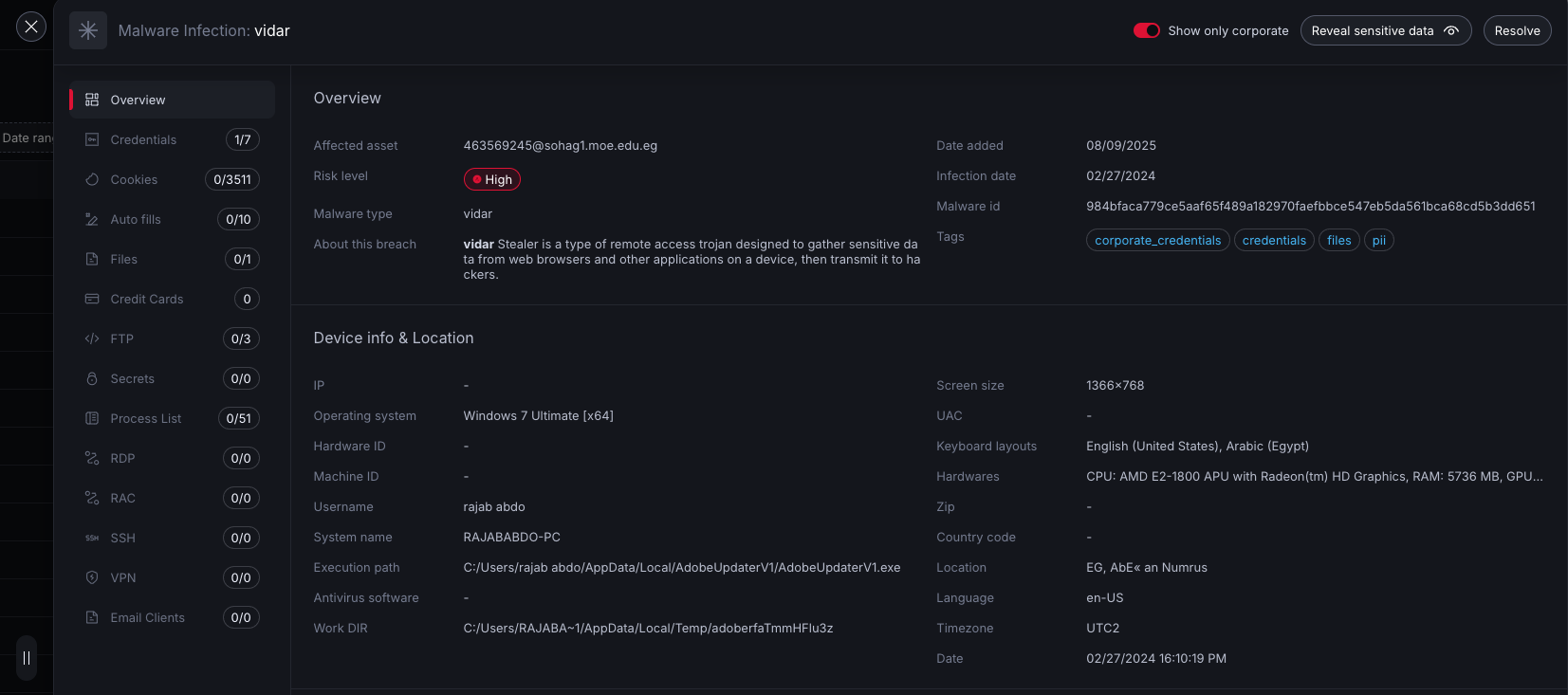
Device & Metadata
Because system_info and metadata largely describe the same host and incident context, we merge them into one “Device & Metadata” block to reduce duplication.
What it is: Host fingerprinting and incident context.
Typical fields drawn from both sources:
- Networking and geo:
ip(often local),ips(may include public),country,zip,location,timezone,language - Identity:
username,system_name,guid,hardware_id,machine_id - OS & hardware:
os,screen_size,keyboard_layouts,hardwares - Security posture:
antivirus_software,uac,process_elevation - Execution context:
date(execution/collection),execution_path,work_dir,oem_id - Contact indicators (if present):
emails,phones - Incident context:
incident_date,published_date(top-level)
How we present it:
- Duplicates such as
hardware_id,machine_id, andcountryare de-duplicated. - Network and geo indicators may contain both local and public IPs if provided.
- Collection and incident timestamps are shown together when available.
This consolidation reduces noise and helps you quickly identify the affected device and timeline.
Defender tips: Use to correlate the victim device in your fleet and timeline the compromise.
Potential misuse: Device fingerprinting, targeted phishing, evasion of geo/IP controls.
Credentials
What it is: Website and application logins extracted from browsers.
Typical fields: url, cleaned_url (domain), username, email, password, application (e.g., “Google Chrome”).
Defender tips: Rotate passwords and enforce MFA; look for password reuse across business-critical services.
Potential misuse: Account takeover, credential stuffing, lateral movement.
Cookies
What it is: Browser cookies, sometimes including session tokens.
Typical fields: name, value, path, domain, expires.
Defender tips: Invalidate sessions on critical services; review for high-value domains (SSO, email, admin portals).
Potential misuse: Session hijacking, bypassing MFA if session is valid.
Autofills
What it is: Browser autofill entries (emails, names, addresses, phone numbers, sometimes other text), stolen from the browser/s.
Typical fields: name, value, browser.
Defender tips: Treat as PII; use to scope exposure and notify impacted users as needed.
Potential misuse: Social engineering enrichment, identity fraud.
Grabbed files
What it is: Files directly exfiltrated by the malware.
Typical fields: File paths (e.g., /work/important.docx).
Defender tips: Assess sensitivity; check for secrets or IP; rotate exposed credentials referenced in files.
Potential misuse: Data theft, extortion, code/secret leakage.
Credit cards
What it is: Stored payment card records from browsers or apps.
Typical fields: name, card_number, cvv, expiration_date.
Defender tips: Treat as sensitive financial data; coordinate with payment processors and the cardholder.
Potential misuse: Fraudulent transactions, financial theft.
Secrets
What it is: Discrete tokens or keys the stealer recognized (e.g., cloud access tokens).
Typical fields: type (e.g., aws-access-token), values (token strings).
Defender tips: Revoke and rotate; review cloud audit logs for misuse.
Potential misuse: Cloud account compromise, data exfiltration, resource abuse.
FTP
What it is: Saved FTP client accounts and optional certificates.
Typical fields: host, port, username, password, applications (e.g., “FileZilla”), optional cert info.
Defender tips: Rotate credentials, review connected servers for tampering.
Potential misuse: Website defacement, code/infrastructure tampering, data theft.
Installed software
What it is: Software inventory captured by the malware.
Typical fields: name, version.
Defender tips: Use to assess vulnerability exposure and risky apps present at time of infection.
Potential misuse: Targeted exploitation of known-vulnerable software.
Process list
What it is: Snapshot of running processes.
Typical fields: pid, name, session_name, cmd.
Defender tips: Correlate with EDR/telemetry; confirm malware runtime and potential persistence.
Potential misuse: Reconnaissance for living-off-the-land techniques.
RDP
What it is: Remote Desktop Protocol saved connections with credentials.
Typical fields: server, username, password.
Defender tips: Rotate credentials and review RDP access controls.
Potential misuse: Direct host access, lateral movement.
RAC (Remote Admin Certificates)
What it is: Digital certificates and their associated private keys used by remote access or administration tools (like certain VPN clients, SSH utilities, or RDP gateways) to establish a secure, authenticated connection to a server or internal network.
Typical fields: private_key, certificate.
Defender tips: Revoke/replace exposed certs and keys.
Potential misuse: Impersonation, man-in-the-middle, unauthorized remote access.
SSH
What it is: SSH client artifacts including known hosts and keys.
Typical fields:
- known_hosts:
host,key_type,key_value - keys:
name,type(public/private),value
Defender tips: Rotate any exposed private keys; update authorized_keys; monitor for anomalous logins.
Potential misuse: Server compromise via key-based auth.
VPN
What it is: VPN application configs and saved credentials.
Typical fields: vpn_name, credentials (username/password), user_config options, openvpn profiles and certificates.
Defender tips: Reset credentials, revoke device profiles, and review VPN logs for suspicious access.
Potential misuse: Perimeter bypass, covert access to internal networks.
Email clients
What it is: Stored email account configurations and saved passwords.
Typical fields: name (client), credentials (e.g., IMAP/SMTP server, username, password).
Defender tips: Reset mail credentials, enforce MFA/app passwords where supported, monitor for forwarding rules.
Potential misuse: Mailbox takeover, BEC, phishing from trusted accounts.
Notes and caveats
- Field variability: Stealer families differ; some blocks may be absent, partial, or formatted inconsistently.
- Age and validity: Items like cookies or credit cards may be expired. Treat all items as potentially sensitive until validated.
- Time semantics:
date_addedreflects the date when the log was added to the NordStellar platform. Useincident_dateordatewhen present to identify exact time of the infection. - PII and secrets: Handle all data under your organization’s data-handling policies. Prioritize revocation and rotation of exposed credentials and keys.
Quick triage checklist
- Identify the device: Use “Device & Metadata” (hostnames, hardware IDs, usernames).
- Contain accounts: Reset credentials for listed
credentials,email_clients,VPN,RDP,FTP. - Revoke secrets: Rotate
secrets, SSH private keys, certificates, and any cloud tokens. - Invalidate sessions: Target high-value
cookiesand SSO services. - Review blast radius: Check
grabbed_filesandautofillsfor sensitive data exposure. - Correlate timeline: Align
incident_date/datewith EDR and authentication logs.