Domain Squatting
Introduction
Domain squatting, also known as cybersquatting, is the practice of registering lookalike domains—often using slight misspellings or variations of legitimate domains—to deceive users, conduct phishing attacks, or impersonate brands. Threat actors use these domains to steal credentials, distribute malware, or carry out fraudulent activities.
NordStellar’s Domain Squatting feature helps you identify and monitor potentially malicious lookalike domains. By detecting various domain permutations, enriching them with relevant data, and providing detailed insights, this feature enables you to take proactive measures to protect your brand and users.
What You'll Find in This Guide
- How Domain Squatting works – Overview of the data collection process.
- Detailed View Breakdown – Explanation of data presented to the user.
How Domain Squatting Works
NordStellar's Domain Squatting feature helps users identify potentially malicious or fraudulent domains that imitate their legitimate domain. This is achieved through automated domain permutation generation, scanning, risk assessment, and AI-driven threat analysis. Below is an overview of how this process works:
1. User Provides Top-Level Domains (TLDs)
Users specify their primary domains (e.g., example.com), which NordStellar will analyze for potential domain squatting threats.
2. Domain Permutation Generation
NordStellar generates a list of visually or textually similar domains using various fuzzing techniques, including:
- Bitsquatting – Swapping a single bit in the domain name.
- Homoglyph Attacks – Replacing characters with visually similar Unicode characters (e.g.,
exampIe.comwith a capitalIinstead ofl). - Omission/Addition – Adding or omitting letters (e.g.,
examplle.com,exmple.com). - Keyboard Proximity Typos – Generating typos based on adjacent keys (e.g.,
exanple.com). - Common Misspellings – Identifying frequently mistyped variations.
- Subdomain Insertion – Adding words before or after (e.g.,
login-example.com).
3. Domain Analysis and Data Collection
For each generated permutation, NordStellar collects:
- WHOIS Information – Details about domain registration, owner, and expiration.
- DNS and IP Data – Identifies where the domain is hosted.
- Geolocation – Determines the server's physical location.
- Redirect Chains – Checks if the domain redirects to another website.
- Website Screenshot – Captures an image of the domain’s landing page.
- Similarity Checks – Compares the visual and textual content to the legitimate domain.
4. Risk Analysis & AI-Powered Threat Enrichment
Once data is collected, it is processed through NordStellar’s AI model, which:
- Assesses potential threats based on collected data.
- Identifies possible malicious intent (e.g., phishing, impersonation, malware hosting).
- Provides remediation recommendations for handling the identified risks.
- Assigns a Risk Level: Info, Low, Medium, High, or Critical.
Detailed Breakdown of the Feature
When users navigate to the Domain Squatting section, they will see a table displaying all the detected results.
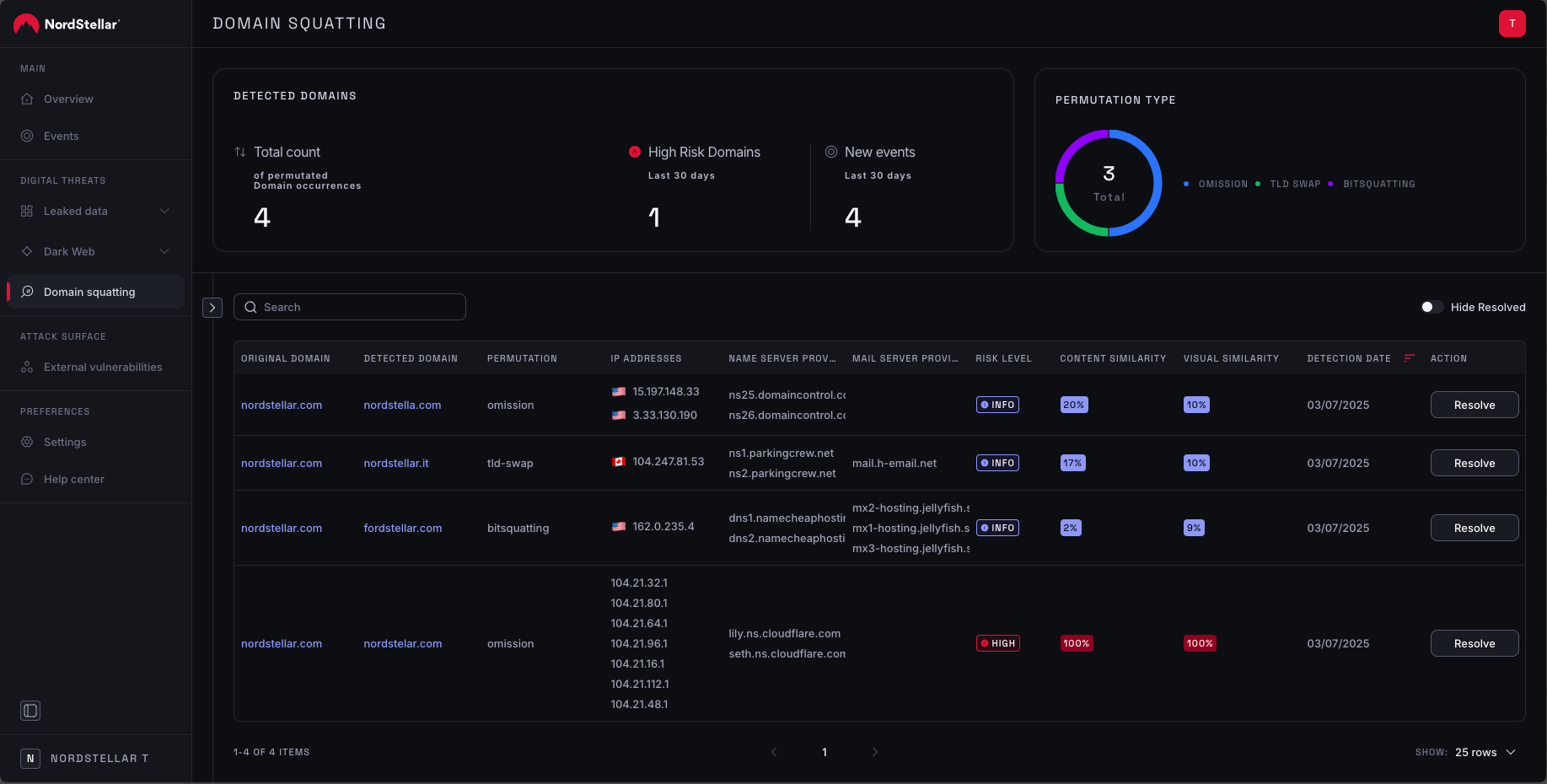
Breakdown of the table
The table contains several key columns:
- Original Domain – This serves as a reference, showing the domain from which the permutation was generated.
- Detected Domain – The domain permutation for which the results are displayed.
- Permutation Type – Indicates the technique used to generate a visually similar domain. For example, the TLD-swap method replaces the original domain's extension (e.g., swapping .io for .ru).
- IP Address & Geo Location – Displays the country where the detected domain's IP address is located.
- Name Server & Mail Server – Helps identify where the domain is registered. In some cases, patterns emerge where multiple typosquatted domains share the same name servers, which could indicate that a single threat actor is targeting your company.
- Risk Level – An AI-generated risk assessment that categorizes the detected domain as Info, Low, Medium, High, or Critical based on various threat indicators.
- Content Similarity – Compares the HTML content of the detected domain to the original domain to check for similarities. A high similarity score may suggest:
- Phishing attempts – The domain may be trying to mimic the real website to steal login credentials or sensitive data.
- Brand impersonation – The website may be pretending to be an official brand page to mislead customers or employees.
- Malicious redirects – Users visiting the fake domain may unknowingly be redirected to malware-infected pages.
- Visual Similarity – Analyzes and compares screenshots of the detected domain with the original domain to identify visual resemblances. A high similarity score could indicate:
- Clone websites – Threat actors may have copied the official site's design to trick users.
- Scam campaigns – Fraudulent websites may use identical branding to promote fake services or scams.
- Credential harvesting – Attackers may set up login pages that look identical to the real website to steal usernames and passwords.
- Detection Date – The date when the scan was performed and the permutated domain was detected.
Breakdown of the Domain View
When a user clicks on a detected domain, a detailed view opens, providing an in-depth analysis of the domain and its potential threats. Here’s a breakdown of the key sections:
AI Analysis
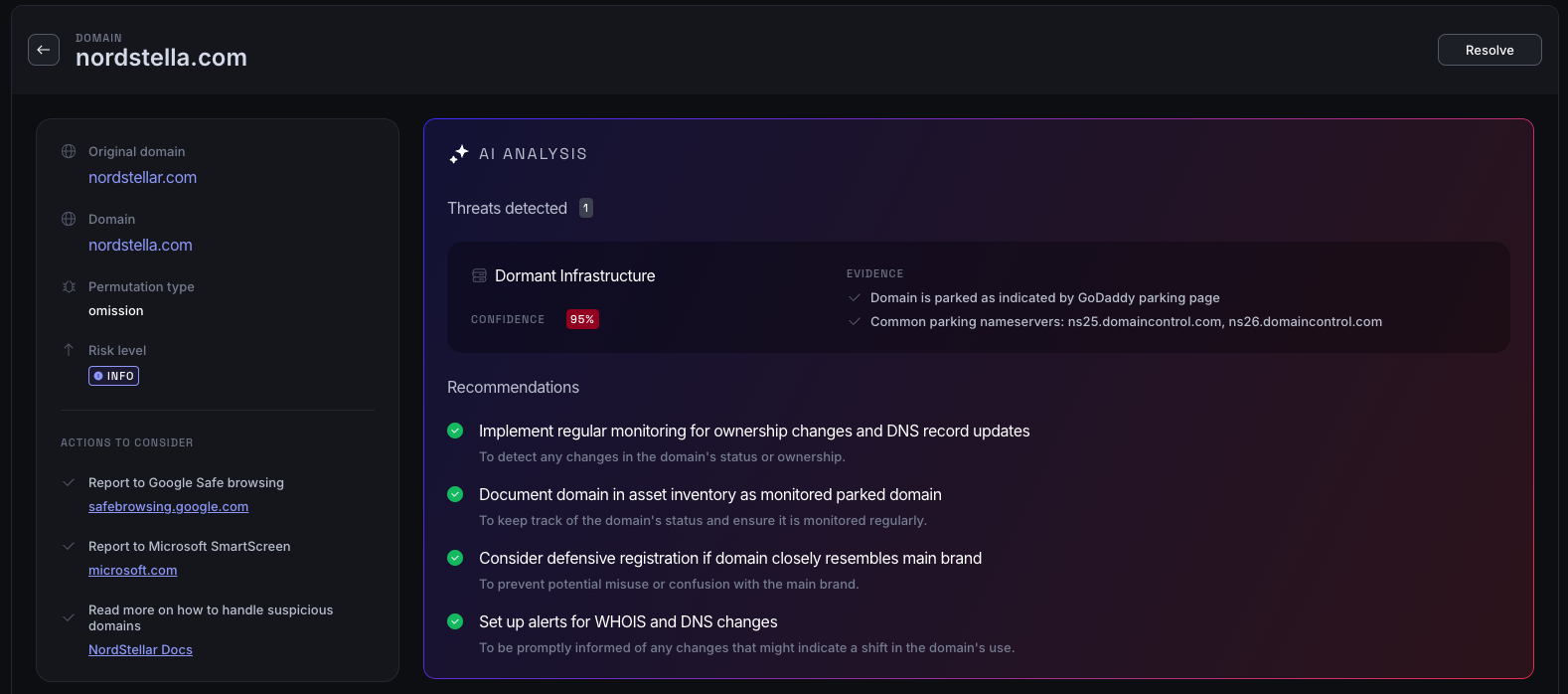
This block summarizes all the gathered information about the detected domain. The AI analyzes multiple data points to:
- Identify potential threats associated with the domain (e.g., phishing, impersonation, malware distribution).
- Provide a confidence score indicating the likelihood of malicious intent.
- Offer supporting evidence based on detected patterns, domain behavior, and similarity scores.
- Suggest remediation steps, helping users take action against identified risks (e.g., reporting the domain, blocking it at the network level).
Details
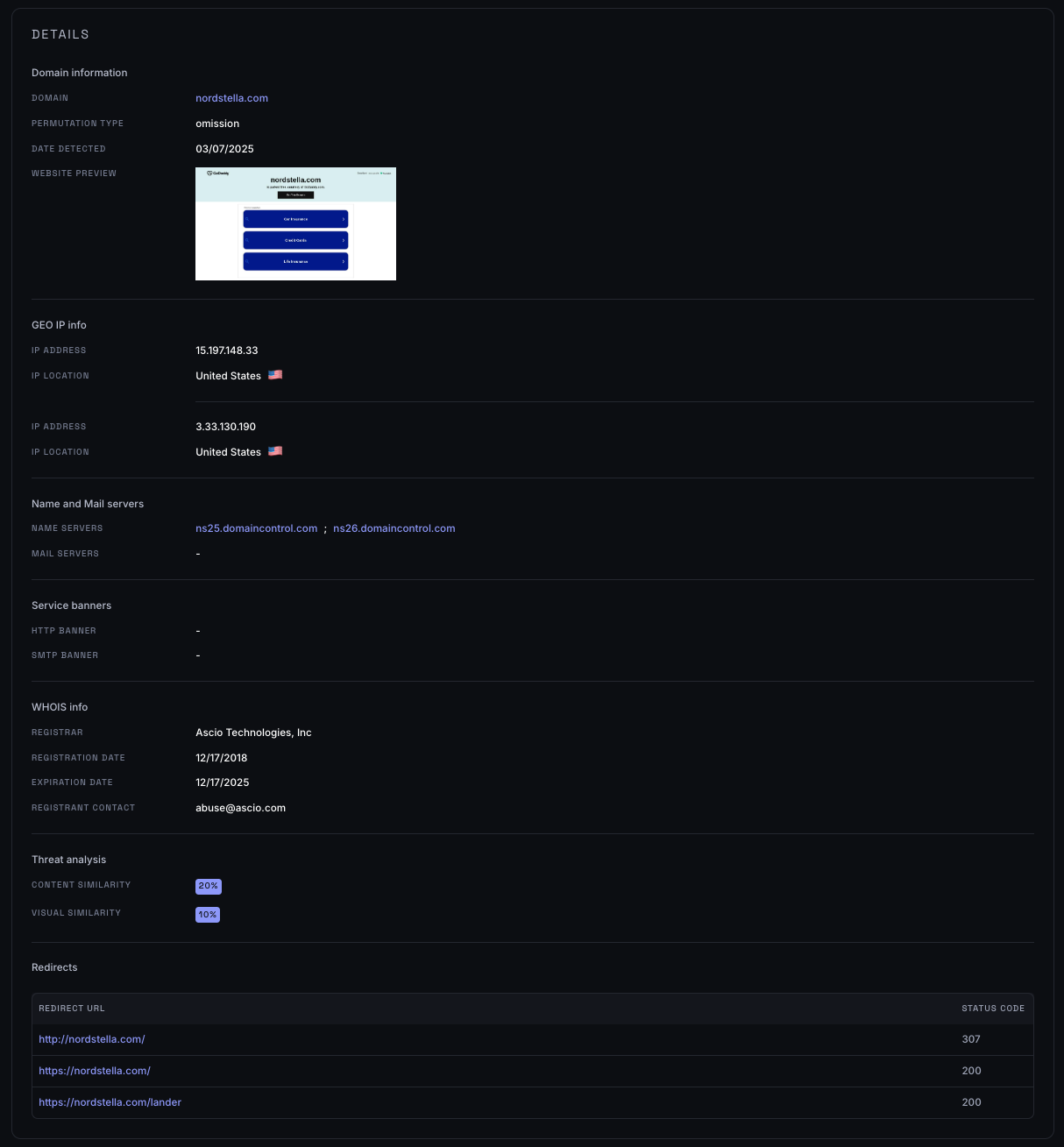
This section contains several smaller blocks with additional technical insights:
Domain Information
- General details about the detected domain.
- A screenshot of the website, helping users visually assess its legitimacy.
Geo IP Information
- Displays the IP address associated with the domain.
- Shows the country where the IP address is registered.
- This data helps determine whether the domain is hosted in a high-risk region known for cyber threats.
Name & Mail Servers
- Lists the detected name servers and mail servers, if available.
- Identifies patterns where multiple suspicious domains share the same infrastructure, potentially linking them to the same threat actor.
Service Banners
- In some cases, we detect service banners (e.g.,
HTTP: Apache/2.4). - This provides insights into the technologies running on the detected domain, which can be useful for security teams in assessing risks.
WHOIS Information
- Displays WHOIS records, including:
- Domain registration details (if available).
- Registrar information (who registered the domain).
- Creation & expiration dates, which can help determine if the domain was recently created (a common tactic in phishing campaigns).
Threat Analysis
- Content Similarity – Measures how closely the content of the detected domain matches the original domain.
- High similarity may indicate phishing attempts or unauthorized duplication of website content.
- Visual Similarity – Compares screenshots of the detected domain against the original.
- High similarity suggests the detected domain may be a clone website used for scams or credential theft.
Redirect Chain
- Displays the full redirect path that occurs when visiting the detected domain.
- This information is useful for identifying:
- Malicious redirects leading users to phishing or malware-infected websites.
- Affiliate fraud where traffic is redirected through multiple domains to manipulate ad revenue.
- Cloaking techniques used by attackers to hide phishing pages from security tools.