Dark Web Search
The Dark Web Search feature allows users to manually search for specific keywords or phrases across various Deep & Dark Web sources. This enables proactive threat investigation, brand monitoring, and detection of leaked data.
Key Benefits
- Proactive Threat Hunting – Actively search for emerging threats and indicators of compromise.
- Brand Monitoring – Detect brand mentions, impersonation attempts, or counterfeit products.
- Data Leak Detection – Discover leaked credentials, sensitive information, or discussions related to potential data breaches.
- Keyword Research – Explore topics and trends within specific online communities.
Dark Web Sources
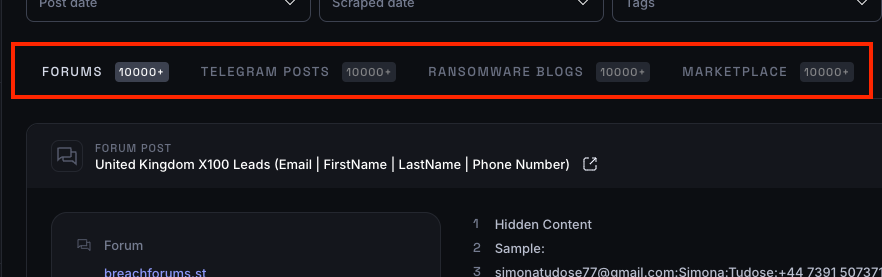
Forums
Underground discussion boards where cybercriminals share tactics, trade stolen data, and advertise illicit services. These forums often contain leaks, hacking guides, and insider threat discussions.
Telegram Posts
Encrypted messaging channels used by threat actors to sell stolen data, share breach announcements, and coordinate cybercrime activities. Telegram’s anonymity makes it a hub for rapid information exchange.
Ransomware Blogs
Websites maintained by ransomware groups where they publicly list victims who refuse to pay ransom. These blogs often contain leaked corporate data and serve as extortion pressure tactics.
Marketplaces
Online black markets where stolen credentials, payment card data, malware, and hacking tools are bought and sold. These marketplaces facilitate cybercrime by providing easy access to compromised data.
How It Works
Basic Functionality
-
Access the Dark Web Search Page
Navigate to the Dark Web Search section in the platform's navigation menu. -
Enter Search Query
- Type your desired search terms into the search bar.
- Queries can be a single keyword, a phrase enclosed in double quotes (for exact matching), or a complex query using Lucene syntax.
-
Set Search Parameters (Optional)
- Tags – Filter search results based on monitored categories.
- Date Range – Specify a timeframe to focus on content posted or scraped within a particular period.
-
Execute Search
- Click the "Search" button to begin.
-
Review Results
- Search results are displayed in separate tabs based on the data source (e.g., Forum Posts, Telegram Posts, Ransomware Blogs or Marketplaces).
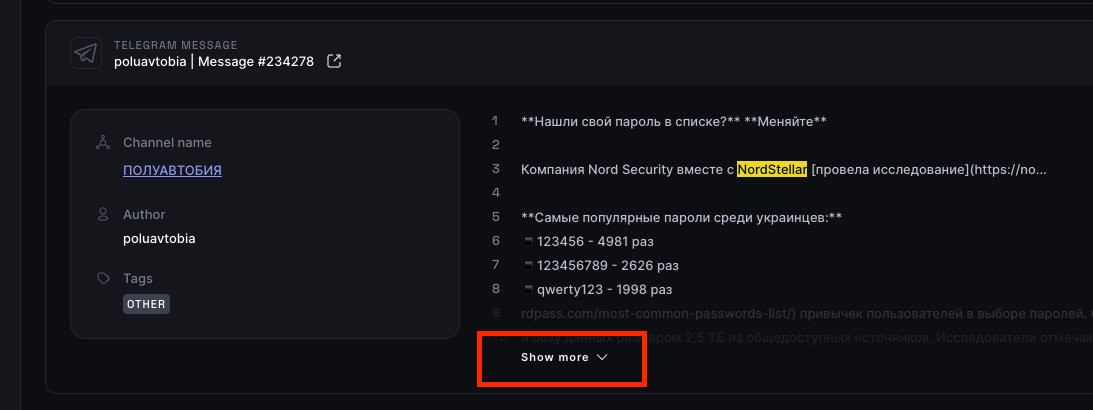
- Click "See More" on an individual post to view the full content (if available).
Advanced Functionality
In addition to manual searches, the platform offers automation tools to streamline recurring searches:
-
Saved Search Filters
- If you frequently search for the same topics, you can create and save search filters for quick access.
- Learn more about filters in the Search Filters section.
-
Automated Monitoring
- You can set up monitoring rules to automatically track your saved search filters.
- The platform will continuously monitor for new matches and generate alerts when relevant content is detected.
- Learn how to configure monitoring rules in the Monitoring Rules section.
FAQ
What data sources are searched?
Currently, the feature searches forums, Telegram channels, ransomware blogs and marketplaces. More data sources will be added over time.
What types of search queries are supported?
You can search using:
- Single keywords
- Phrases (enclosed in quotes for exact matching)
- Complex queries using Lucene Syntax
Can I use search operators like AND, OR, NOT?
Yes! The search fully supports Lucene query operators, including AND, OR, NOT, and more.
Are search results real-time?
Results are based on the most recently collected data from each source. The collection frequency may vary depending on the source.
How is the data ranked?
There is no ranking algorithm applied. All results that match your search criteria are displayed without any prioritization.